The official password manager weighs 1.3 GB to show you a list of passwords. This one is 41 MB.
vwclient is a free, open-source desktop client for a self-hosted Vaultwarden server. Sign in, find the entry you need, copy the password. That is the whole job, and it is a job that does not need a browser engine resident in memory to do it.
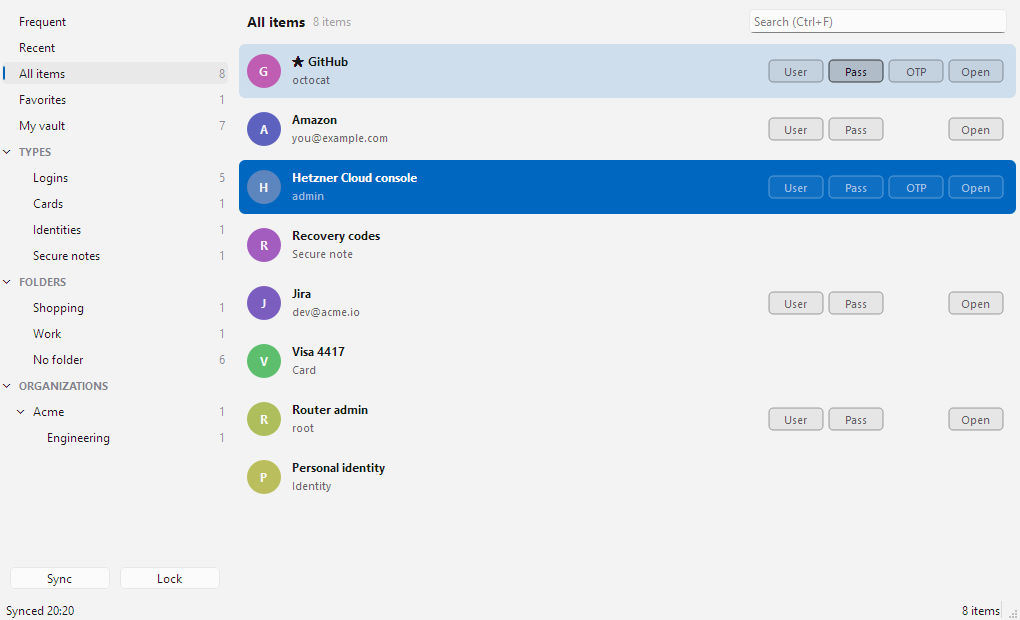
The vault: one compact row per item, with the copy buttons already on the row.
It is a single executable, no installer, and it sits at roughly 8 MB of working set on the login screen. It talks to the Vaultwarden endpoints directly, and when something fails it shows you what the server actually said instead of a generic error.
One executable. No installer. Nothing secret ever written to disk.
GPL v3. Free, and free of any upsell. Source on GitHub.
Why we built it
We run our own Vaultwarden server, and we open it dozens of times a day. Three things pushed this over the line.
Weight. The official Bitwarden desktop app for Windows is an Electron application. The portable build alone is 293 MiB as a single download; a full install lands around 1.3 GB. It carries a browser engine, permanently resident, to render what is in daily use a searchable list of names and passwords.
The interface. The official app buries the thing you actually do — copy a credential — behind selecting an item, opening it, then hunting for a copy icon. And its idea of "recent" is nonexistent: every session starts you at the same alphabetical wall, whether you use an entry forty times a week or once a year.
Vaultwarden. The official client targets bitwarden.com. Self-hosted Vaultwarden is a compatible re-implementation, not the thing it is tested against, and in practice the pairing is unreliable — sync stalls, spurious re-auth, and failures that are opaque because the client will not tell you what the server said. This client tolerates both the PascalCase and camelCase JSON that different Vaultwarden versions return, and surfaces the server's own error message.
The same task, measured
- ~1.3 GB — official Bitwarden desktop, installed.
- 293 MiB — its portable build, as one download.
- 41 MB — vwclient, one executable, no installer.
- ~8 MB — working set at the login screen.
It opens on the entries you actually use
Not on an alphabetical list of everything you have ever saved.
Every copy, one-time code and URI open is recorded locally, and Frequent and Recent sit at the top of the navigator. Frequency is a decaying score with a 14-day half-life, so the entry you hammered during last year's project stops crowding out the one you use this week.
Rows carry a 34× · 1d ago label, the list re-ranks the instant you copy something — keeping the row you just used selected, so a second copy does not chase a moving target — and the app opens straight into Frequent once there is history to show. For most people this is the only screen they will ever need.
The history file holds only opaque cipher ids and counters: no names, URLs, usernames or secrets. The account it belongs to is stored as a truncated SHA-256 digest of server plus email, so several accounts can share the file without revealing which is which.
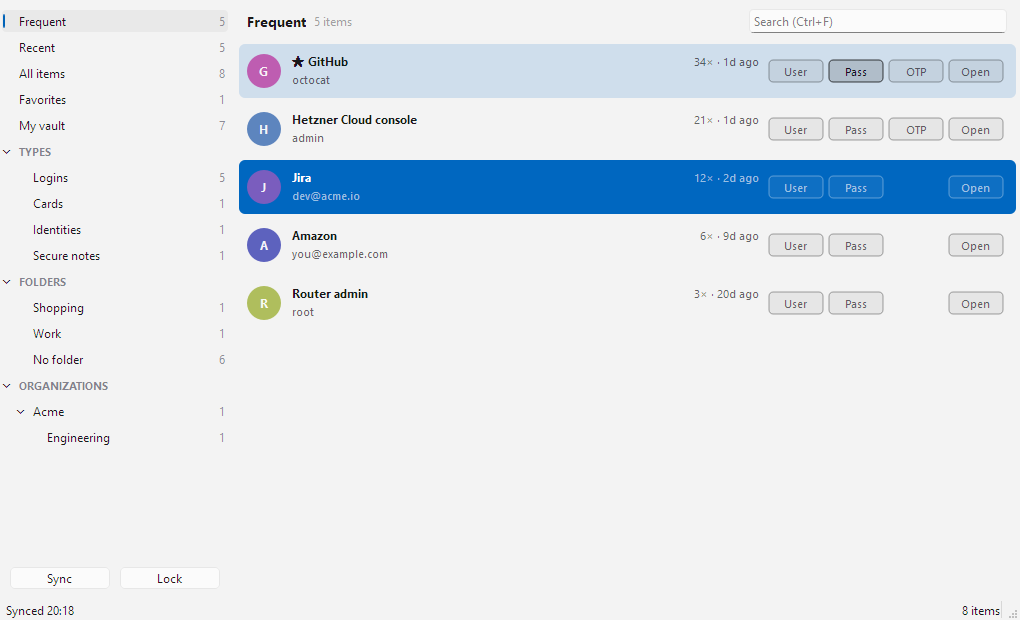
Frequent, ranked by a decaying score rather than by name.
Copy without opening anything
Every row carries User / Pass / OTP / Open buttons in fixed columns, shown only when the item actually has that field. One click, straight to the clipboard.
Search that combines
Multi-word search matches name, username, folder, organization, collection and URIs, and it combines with whatever the navigator has selected rather than replacing it.
You always know which one
Every row shows the folder it lives in — or its collections, for organization items — beside the name, in every section. A name that appears twice still tells you which one you are looking at.
Nothing secret is ever written to disk
Memory only
No master password, no keys, no tokens, no cached vault on disk — everything lives in memory for the session only. The master password derives the master key and the server proof-of-knowledge hash, then the master key is wiped as soon as the vault key is unwrapped.
A clipboard that clears itself
Copied passwords are cleared after 30 seconds — only if the clipboard still holds them — and are flagged so they stay out of Win+V history and Cloud Clipboard sync entirely.
Authenticated decryption
Every MAC-protected EncString is authenticated before decryption, and a failed MAC is an error rather than a silent fallback. Items that fail to decrypt degrade to a single warning row instead of taking down the whole sync.
A lock that understands what "idle" means
Auto-lock measures input across the whole desktop, not just this window. Copying a password and then working in your browser for half an hour keeps the vault open; walking away from the machine locks it.
And locking does not make the app vanish. The window stays exactly where it was and swaps its contents for a lock screen, while the keys, every decrypted item and even the folder names are dropped from memory and the clipboard is wiped. Type your master password to pick up where you left off.
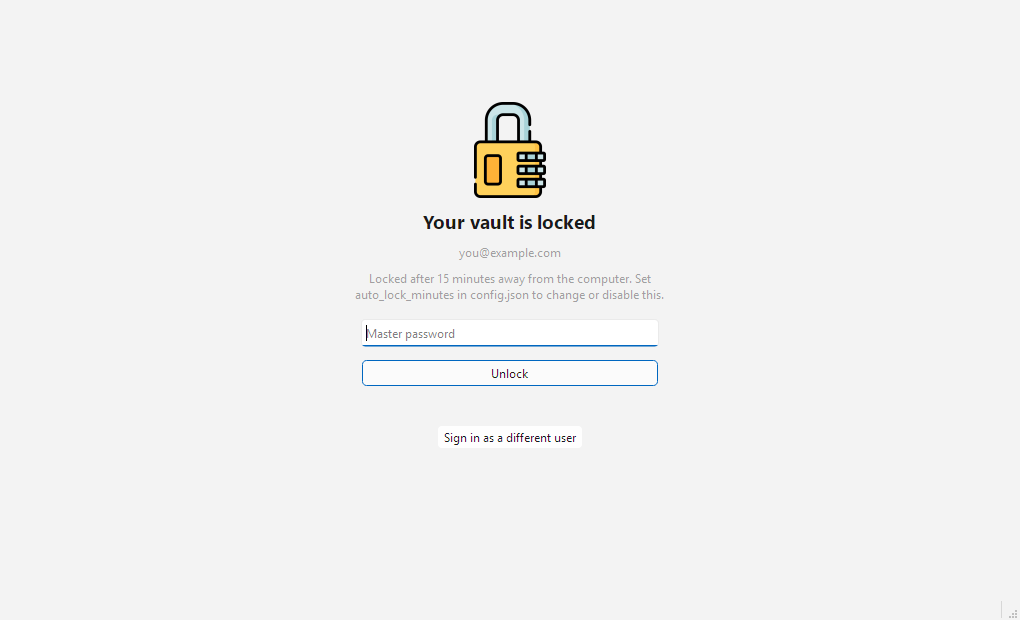
Locked in place: same window, no vault behind it.
What it does
The whole feature set, stated plainly.
Authentication
- PBKDF2-SHA256 or Argon2id key derivation, whichever your account uses, with the server's own parameters.
- Two-step login by authenticator app (TOTP) or email code, with an optional "remember this device".
- Access tokens refreshed automatically when they expire mid-session.
- Duo, WebAuthn and YubiKey are detected and reported, not supported.
The vault
- Full sync, decrypting personal items, organization items via the RSA-wrapped org keys, and items carrying their own per-item key.
- Folders and organizations resolved to names; trashed items hidden.
- Navigator with Frequent, Recent, All items, Favorites, item types, folders and every organization with its collections — each with a live count.
- Double-click or
Enteropens the detail sheet: reveal-on-demand password, live TOTP with countdown, every URI, custom fields and notes.
Settings
- Auto-lock delay, clipboard clear delay, remembering the email address and coffee breaks — all in the app, or by hand in a plain
config.json. - Changes apply to the running session immediately.
- Set auto-lock to
0to disable it, or clipboard clear to0to keep contents. - The UI follows the system light and dark palettes.
Coffee breaks (off by default)
- A password manager that tells you to go and get a coffee: it nudges you after a configurable stretch at the keyboard.
- Working time comes from the same desktop-wide idle signal as auto-lock, so an hour in the browser still counts — and five minutes away from the machine is the break, restarting the clock.
- The reminder is a small always-on-top window that never takes keyboard focus, because this app spends its life minimized.
- Three ways out: Lock & step away, Snooze, or Dismiss.
Everything reachable from the keyboard
Open, copy, lock — without touching the mouse.
| Shortcut | Action |
|---|---|
Enter / double-click | Open item details |
Ctrl+F | Focus search |
Ctrl+B | Copy password |
Ctrl+U | Copy username |
Ctrl+T | Copy TOTP code |
Ctrl+Shift+U | Copy URI |
Ctrl+O | Open URI in browser |
Ctrl+R | Sync |
Ctrl+, | Settings |
Ctrl+L | Lock |
Ctrl+Shift+C | Clear clipboard now |
What it deliberately doesn't do
So the scope is unambiguous before you download it.
It is a reader. Creating, editing and deleting entries all still belong in the web vault or the official client. That is the trade that keeps it 41 MB.
No attachments and no Sends. Same reason — both pull in machinery that the copy-a-password job never touches.
No offline cache. Nothing secret is written to disk, which also means there is no encrypted local vault to open when the server is unreachable.
No Duo, WebAuthn or YubiKey two-step login. They are detected and reported clearly; authenticator-app and email codes are what this iteration supports.
Password history and key rotation are not handled in this iteration either.
Getting it running
A download and a server address. There is nothing to install.
- Download the Windows executable from the latest release and put it wherever you keep your tools. It is a single file — no installer, no admin rights.
- Run it and enter your Vaultwarden server URL, email and master password. Two-step codes are prompted for when your account uses them.
- Copy what you need. After a few sessions the app opens straight into Frequent.
- Open Settings (
Ctrl+,) to set the auto-lock delay, the clipboard clear delay, and whether you want coffee-break reminders.
Prefer to run from source, or you are not on Windows? The repository has the virtualenv and PyInstaller instructions — it is Python 3.13 and PySide6, and the build spec excludes some fifty unused Qt modules to keep the binary where it is.
FAQ
The questions people ask before trusting a client with their vault.
It was written for and tested against self-hosted Vaultwarden, which is what you point it at by entering your own server URL. It speaks the same API, so it is not architecturally limited to Vaultwarden — but Vaultwarden is the case it is built and tested for.
That is your call to make, and the honest answer is: read the code. It is GPL v3 and the whole thing is a few thousand lines of Python — small enough that one person can actually audit it, which is not true of the alternative. It ships with 74 tests covering key derivation (cross-checked against hashlib and cryptography's own HKDF), MAC tampering rejection, organization and per-item key unwrapping, RFC 6238 TOTP vectors, the lock cycle, and that the usage file contains no item content. Like all GPL software it comes with no warranty.
The prebuilt executable is Windows x64. The code is Python and Qt, so it runs from source elsewhere — but two things are Windows-specific: the desktop-wide idle signal behind auto-lock and coffee breaks, and the clipboard flags that keep passwords out of clipboard history. On platforms that cannot report desktop idle, auto-lock falls back to the app's own input events.
Yes. Organization items are decrypted through the RSA-wrapped organization keys, items carrying their own per-item key are handled too, and each organization appears in the navigator with its collections and live item counts. Organization rows show their collections beside the name.
No. It is an independent, unofficial client, not produced, endorsed or supported by Bitwarden Inc. or by the Vaultwarden project. "Bitwarden" is a trademark of Bitwarden Inc., used here only to describe compatibility. It is licensed GPL v3 — the same license the official Bitwarden clients use, so code can move either way without friction.
We use it every day
vwclient is free and GPL v3, with no paid tier, no account and no upsell attached. We built it because we run our own Vaultwarden and wanted the copy-a-password job to take one click and 41 MB. The source is open if you would rather read it than trust it.